Tool Calling, APIs, and Enterprise Integration
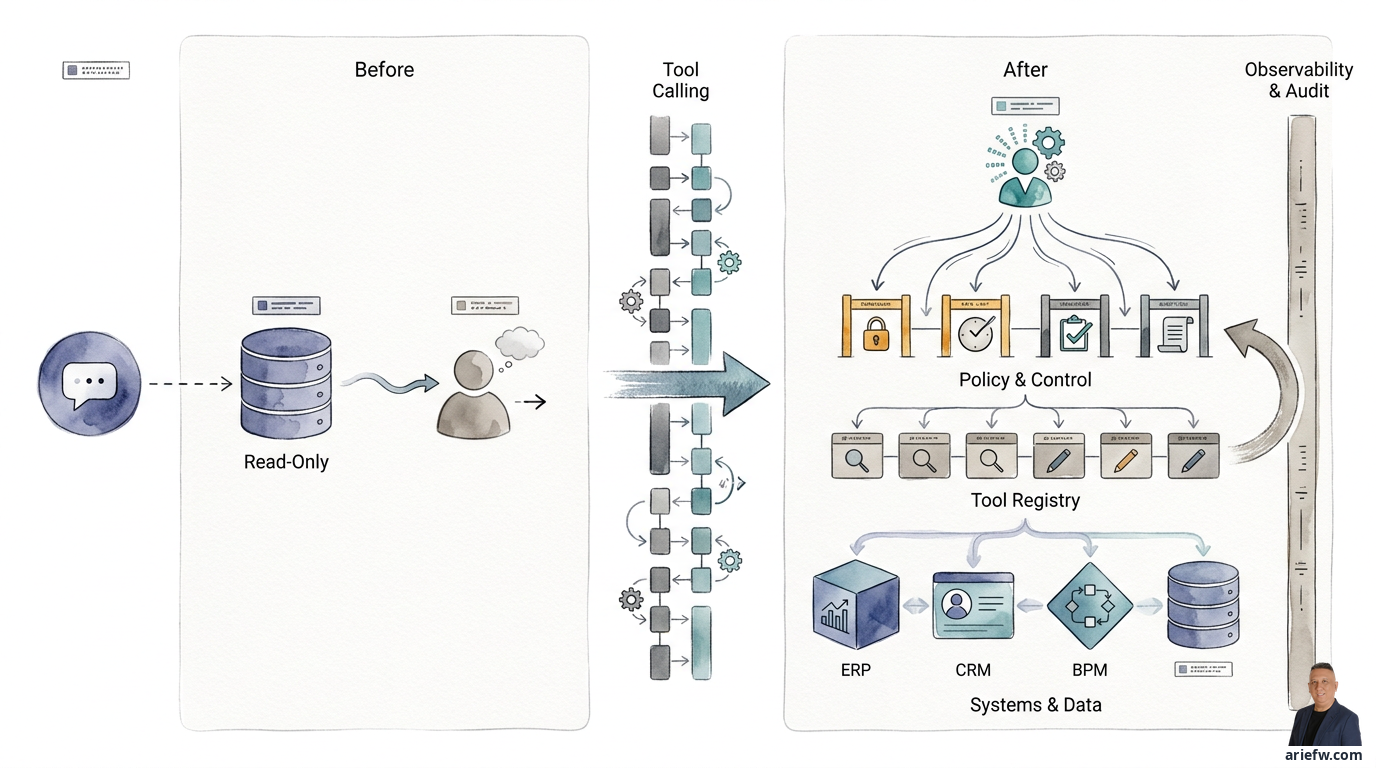
Imagine your finance team has started using AI to help with the monthly book close process. The current copilot is smart enough to explain why an invoice is on hold. But when the team asks, "Can this AI actually fix the status?" the answer is no. Invoice data is scattered across the ERP, vendor spreadsheets, and confirmation emails. POs need to be checked, goods receipts need to be compared, and if there's an issue, a case must be opened in the workflow system. All these steps are still manual.
The question that arises isn't about how sophisticated the language model is, but rather: how can AI truly help execute this process, not just explain it?
This is the problem many companies face today. They have interesting AI pilots, but the business value isn't tangible because the AI stops at recommendations. The agent can't touch the actual systems. Yet, without the ability to pull data from the ERP, check status in the CRM, or update a ticket in the ITSM, AI is just an answer engine that never executes.
From Explaining to Doing
The difference between an ordinary copilot and an agent truly useful for business operations comes down to one thing: the ability to act. A copilot can explain why an invoice is on hold. But an agent helping with the finance close process must be able to pull invoice data from the ERP, check PO status, compare it with goods receipts, open a case in the workflow system, send a clarification request to the vendor or buyer, and then update the case status when conditions are met.
This capability is called tool calling. The model doesn't just generate text; it selects and invokes external capabilities to get work done. A tool could be an API to an ERP or CRM, a database query, a function to create a ticket, a connector to email, a workflow action in a BPM system, or an internal service like a policy checker or pricing engine.
Without tool calling, an agent is just a talkative analyst. With tool calling, the agent starts to become an executor that can complete tasks.
Not All Tools Carry the Same Risk
This is where many organizations make a mistake. They treat all tools as if they are the same, when operationally there is a huge difference between a tool that only reads data and one that changes the state of the business.
Read-only tools, like checking invoice status, retrieving customer history, reading procurement policies, or searching knowledge articles, carry relatively lower risk. Even though access control and logging are still necessary, the impact of an error is limited to incorrect information, not damaging data changes.
Conversely, action tools like creating a new vendor, changing a customer address, issuing a PO, closing a ticket, processing a refund, or executing a configuration change carry significantly higher risk. These actions have a direct impact on the company's operations, controls, and accountability.
This separation isn't a technical detail. It's the foundation of governance. Many companies are too quick to give agents action access when the use case only requires read-only. As a result, risk increases faster than the value generated.
Controls Tighten as You Get Closer to Action
Once an agent can write to a system, the company must treat every tool call like a formal operational action. At a minimum, it must be clear which agent is making the call, on whose behalf, what data is being used, which tool is being called, what parameters were sent, what result was received, and whether any approval or policy check occurred before execution.
In finance close, for example, an agent that only prepares a draft journal entry is fundamentally different from an agent that actually posts the journal to the ERP. The former might be fine with human-in-the-loop. The latter almost certainly requires much tighter controls, and might not even be appropriate for an initial phase.
In procurement, an agent that reads a contract and suggests a purchasing path is one thing. An agent that activates a new vendor or issues a PO is something else entirely.
The principle is simple: the greater the business impact of a tool call, the higher the need for validation, policy enforcement, and auditability.
APIs as the Safe Path
If tool calling is the mechanism for action, then APIs are the healthiest path for connecting an agent to enterprise systems. APIs provide a structured, documented, and controllable interface. The agent doesn't need to "play" on the screen like a human. It simply calls an endpoint that is designed to read or write data according to system rules.
Many organizations are tempted to use approaches like RPA or browser automation: let the agent operate the UI like an employee. This approach can sometimes be useful as a temporary bridge, especially if legacy systems lack adequate APIs. But as a primary pattern, it is weak.
A UI is not a stable integration contract. Screen layouts change, fields move, labels change, and click flows can differ between versions. An agent that depends on the UI will be fragile. Control is also harder to enforce because at the UI level, it's difficult to restrict an agent to only certain actions without granting overly broad access. Audit trails are worse because API calls can usually be logged explicitly, while the trail from UI automation is blurry. Schema validation is also weaker because APIs allow for formally validated input and output.
Therefore, if a company is serious about building an agentic operating model, APIs must be the primary path. UI automation should only be used in limited cases, with clear compensating controls, while integration modernization is still underway.
Every Endpoint as a Control Point
Not every API that is safe for a regular application is automatically safe for an agent. Agents work with a different pattern: faster, more frequent, and sometimes more autonomous. Therefore, every endpoint that an agent can call needs to be treated as a control point.
There are at least four basic disciplines. First, permissions: the agent must have the minimum necessary access rights. Don't use a generic service account with broad access just to speed up a pilot. Second, rate limits: an agent can generate a high volume of calls, especially if a loop or poor retry logic occurs. Third, schema validation: input from the agent must be strictly validated. If a tool expects a customer_id, refund_reason, and amount, the payload must conform to the schema, not be free-form, ambiguous text. Fourth, audit logging: every call must be recorded, not just for security but also for operations, incident investigation, and continuous improvement.
In enterprise practice, components like API gateways and policy engines become very important. An API gateway helps manage authentication, throttling, observability, and routing. A policy engine ensures that even if an agent "wants" to do something, that action must still pass business rules and risk controls.
Imagine a customer service agent wants to process a refund. A healthy design isn't to give the agent direct access to a full refund function. A safer design is for the agent to call an eligibility check endpoint, the policy engine checks thresholds and customer history, if it meets the criteria for bounded autonomy, a small refund can be processed, if it exceeds a certain threshold, the system automatically requests supervisor approval, and all steps are logged. With this pattern, the API is not just a technical connector. It becomes a safe path that enforces operational discipline.
A Capability Catalog, Not a List of Connectors
As the number of tools grows, a company needs more than just integration documentation. They need a tool registry: a centralized catalog that describes what tools are available, their business function, who can use them, input-output schemas, target systems, risk level, read or write access mode, dependencies, and applicable guardrails.
Without a registry, the agent orchestrator tends to rely on integrations that are hardcoded one by one. This might be acceptable for one or two use cases. But when a company starts to have many agents across different functions, this approach quickly becomes unmanageable.
A tool registry provides three major benefits. First, it separates capability from implementation. The orchestrator doesn't need to know the technical details of every integration. It just needs to know there is a tool called "check PO status" or "create incident ticket," complete with its input-output contract. Second, it becomes the basis for selecting the right tool. In a real workflow, several tools might look similar but have different scopes. The registry helps select the capability that matches the context, permissions, and risk. Third, it becomes a control point during an incident. If there is a problem with a specific tool, the company needs to be able to disable or restrict that tool quickly without shutting down the entire agent platform.
For an enterprise, a useful registry typically includes the tool name and description, business owner and technical owner, target system, risk category, input-output schema, permission model, approval requirements, rate limits and SLA, tool version, operational status, and audit and observability hooks.
There is an organizational implication that is often overlooked. Once a tool registry exists, a company can start to see its digital capabilities more explicitly. Process owners understand what actions are truly available to agents. Risk owners set autonomy limits per tool. The platform team manages the lifecycle. Operations teams train humans to work alongside agents. The registry helps translate architecture into an operating model. It makes discussions about agents no longer abstract, but concrete: which tools can be used, by whom, and under what conditions.
The Most Common Mistakes
Many agentic programs fail not because the model is weak, but because the integration pattern was wrong from the start. There are several very common anti-patterns.
Giving an agent UI access like a human is perhaps the most common. Wanting to move fast, a team gives the agent access to an application via browser or desktop automation. In the short term, the demo looks successful. In production, problems start: the flow is fragile, access rights are too broad, UI changes break the automation, auditing is difficult, and debugging is expensive.
Not distinguishing between read-only and action tools is also a problem. If all tools are treated the same, governance becomes chaotic. Read-only tools can be given bounded autonomy more quickly. Action tools must go through risk classification, approval logic, and stricter observability.
Hardcoding integrations in every agent is also common. Each team builds its own connector to the ERP, CRM, or ticketing system. The result is duplication, inconsistent schemas, non-uniform access controls, and high maintenance costs. This is a fast track to agent sprawl.
Ignoring policy enforcement at runtime is also widespread. Many organizations design policies in documents but don't embed them into the execution path. As a result, an agent can technically perform an action that should be restricted by policy.
Not preparing a fallback when a tool fails is also dangerous. Tool calls will fail. APIs can time out. Schemas can change. Target systems can go down. If an agent doesn't have a clear fallback, it can stop mid-process or retry endlessly without control.
A Simple Principle
If this entire topic had to be summarized into one principle, it would be this: an agent may only act through an auditable interface. Not through wild UI access, not through overly broad service accounts, not through tools without clear schemas, not through unrecorded integrations.
An auditable interface means there is identity, there are permissions, there is an input-output contract, there is policy enforcement, there is logging, there is observability, and there is a mechanism to stop things if an incident occurs.
This principle is important because agentic AI, in the end, isn't about how smart the AI is, but about whether the AI can be trusted to help run the company.
For the CIO, this means the integration and API modernization agenda becomes far more strategic than before. For the COO, this means process redesign must consider which action points are appropriate to open up to agents. For the CHRO and transformation leader, this means the change in human roles will be heavily influenced by what tools are available, how safely an agent can act, and where humans remain the control point.
The question to take away: is your company's API and integration layer ready to become a digital execution path, or is it still designed only for traditional applications? Which operational actions are truly appropriate to open up to agents, and which must remain under human control? If agents start taking over routine actions through tools and APIs, where will frontline and supervisor roles shift? Are we building an agent that can scale across the enterprise, or just a demo that works because controls are still manual?